UX Audit Checklist for SaaS Products
Author
Vignesh
Published On

Many SaaS teams ship powerful features but still struggle with low activation, high churn, and slow expansion. Founders and product teams watch KPIs stagnate despite heavy investment in engineering and marketing. The missing link is often product experience: confusing flows, unclear value communication, and hidden friction that blocks users from realizing value.
This guide, written from the perspective of a Senior UX Strategist and SaaS Growth Consultant, gives you a tactical, data-backed UX audit checklist tailored for B2B SaaS. Use it to diagnose problems, prioritize fixes, and convert insights into measurable growth faster activation, better retention, and higher LTV.
Why Most SaaS Products Struggle Despite Having Great Features
The Feature Trap: More Is Not Always Better
Most SaaS teams default to a dangerous assumption: if users are leaving, it must be a feature problem. So they build more. They ship faster. They launch another roadmap cycle.
But research consistently tells a different story. According to Forrester, every dollar invested in UX returns up to $100 in value. And yet, most SaaS products are designed from the inside out built around technical architecture, internal assumptions, and feature completeness rather than around the user's mental model and actual workflow.
The result? Products that are functionally capable but experientially broken.
The Hidden Cost of Poor UX in SaaS
Poor B2B SaaS user experience doesn't just frustrate users it silently destroys revenue metrics across every stage of the funnel:
Activation rates drop when onboarding flows confuse new users before they reach their "aha moment."
Retention declines when users hit friction repeatedly and lose confidence in the product.
Expansion revenue stalls when power features are buried too deep to discover organically.
Support costs balloon when UI copy is ambiguous and error states are unhelpful.
Word-of-mouth breaks down when the product doesn't feel intuitive enough to recommend.
The uncomfortable truth: most SaaS churn is a UX problem wearing a product problem's mask.
What Is a UX Audit for SaaS Products?
A UX audit sometimes called a usability audit or experience audit is a structured, evidence-based evaluation of your product's design, flows, and touchpoints. It identifies where your SaaS user experience breaks down, creates confusion, or fails to guide users toward meaningful action.
Unlike a redesign, a UX audit is diagnostic. It answers three core questions:
Where are users getting stuck or dropping off?
Why does the interface fail to communicate value or guide action?
What specific changes will have the highest impact on growth metrics?
What a SaaS UX Audit Covers
A comprehensive audit typically examines:
Information architecture Can users navigate the product intuitively?
Onboarding and activation flows Does the product guide users to value, fast?
Visual hierarchy and UI clarity Does the interface communicate priority and action clearly?
Form design and input patterns Are workflows frictionless or frustrating?
Error handling and empty states Does the product support users when things go wrong?
Mobile and cross-device responsiveness Does the experience hold up everywhere?
Accessibility compliance Is the product inclusive and legally compliant?
Content and UX copy Does language guide, reassure, and convert?
Performance perception Does the product feel fast, even when it isn't?
Why UX Audits Are Critical for SaaS Growth
UX Is a Growth Lever, Not a Design Preference
In B2B SaaS, user experience is no longer a soft metric it's a hard growth variable. The quality of your SaaS product design directly affects:
Trial-to-paid conversion rates
Time-to-value (TTV) during onboarding
Net Revenue Retention (NRR)
Customer Lifetime Value (LTV)
Product-led growth (PLG) loop velocity
A UX audit identifies exactly where each of these metrics is being undermined and prioritizes the highest-leverage improvements for your stage and growth goals.
The Business Case for Regular UX Audits
Most SaaS teams run audits reactively after a major churn spike or a redesign project. But high-growth SaaS companies embed UX audits as a regular cadence typically quarterly or after each major release because user behavior evolves, and so do the friction points.
A proactive UX audit approach means:
You catch problems before they compound into churn.
You validate design decisions with evidence, not opinion.
You give your product and growth teams a shared language for prioritization.
You build a culture of user-centricity that compounds over time.
Common UX Problems Found in SaaS Products
Before diving into the checklist, it's worth cataloguing the most frequently discovered issues in B2B SaaS UX audits because awareness accelerates diagnosis:
Onboarding
No clear "aha moment" design within the first session
Mandatory fields that delay value delivery
Lack of contextual tooltips or progressive disclosure
Navigation and Information Architecture
Feature discoverability relies entirely on user exploration
Inconsistent navigation patterns across modules
No clear information hierarchy in dashboards
Dashboard and Data Visualization
Data-heavy interfaces with no interpretive guidance
Graphs without clear labels, filters, or actionable context
Mobile dashboards that collapse into illegible layouts
Forms and Workflows
Multi-step forms with no progress indication
Vague error messages that don't explain how to fix problems
Lack of autosave or undo functionality
Conversion Touchpoints
Weak CTAs with generic copy ("Submit," "Continue")
Upgrade prompts that feel punitive rather than aspirational
No social proof or trust signals at decision points
Accessibility and Inclusivity
Insufficient color contrast ratios
Non-keyboard-navigable interactive elements
Missing alt text and ARIA labels
How to Conduct a SaaS UX Audit Step-by-Step
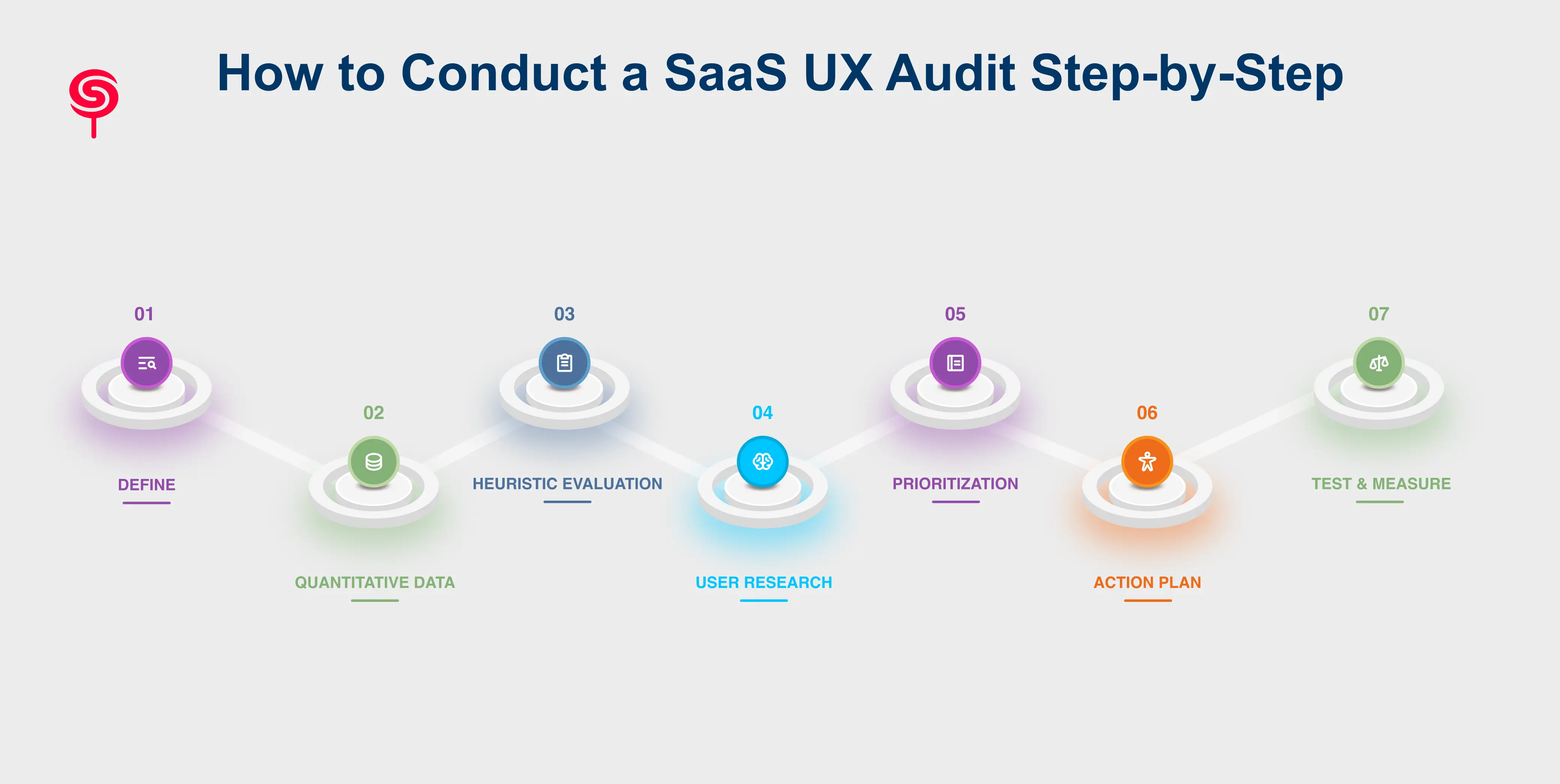
Step 1: Define Scope and Success Metrics
Before auditing anything, align on what you're trying to improve. Are you focused on activation? Retention? Conversion? Define the north star metric for this audit and the 2–3 supporting metrics that feed it.
Step 2: Gather Quantitative Data
Pull your analytics. Map your funnels. Identify where users are dropping off, which features have low adoption, and what support topics generate the most tickets. This data directs the qualitative work.
Step 3: Conduct Heuristic Evaluation
Have a UX expert or a structured framework like Nielsen's 10 Usability Heuristics evaluate the product systematically. Document every issue by severity: critical, major, minor.
Step 4: Run User Research
Combine session recordings (to observe actual behavior) with moderated usability tests (to understand reasoning). A minimum of 5 usability test participants will surface approximately 80% of critical issues.
Step 5: Synthesize and Prioritize Findings
Map findings to the business impact vs. implementation effort matrix. Prioritize quick wins that address high-impact, low-effort improvements first these create immediate momentum.
Step 6: Build a Prioritized Action Plan
Translate findings into a design backlog with clear ownership, acceptance criteria, and expected impact hypotheses. Group changes by theme: onboarding, navigation, conversion, etc.
Step 7: Implement, Test, and Measure
Implement improvements iteratively. Measure the impact against baseline metrics. A UX audit without measurement is just opinion the real value is in the data-validated improvement cycle.
Business Outcomes of a SaaS UX Audit
A well-executed SaaS UX audit isn't a design expense it's a revenue investment. Here's what teams consistently see after acting on audit findings:
Increased Activation Rates Streamlined onboarding that removes friction and delivers faster time-to-value directly increases the percentage of trial users who reach their first meaningful success moment the trigger for conversion.
Reduced Churn When users can accomplish their goals without friction, frustration, or reliance on support, they stay. CandyStudio clients have seen churn reductions of 20–40% following targeted UX improvements to retention-stage workflows.
Higher Trial-to-Paid Conversion Improving upgrade touchpoints, reducing cognitive load in the decision-making journey, and aligning copy with user intent can materially lift conversion rates often without changing pricing or packaging.
Lower Support Costs Every UX improvement that eliminates an unclear UI pattern, ambiguous error message, or confusing workflow reduces the volume of support tickets directly lowering your cost to serve.
Faster Product-Led Growth When the product itself is the best salesperson guiding users to value, surfacing expansion opportunities naturally, and making sharing and collaboration effortless your PLG loop accelerates.
Stronger NPS and Word-of-Mouth UX quality is one of the strongest predictors of Net Promoter Score in SaaS. Users who feel confident, capable, and respected by your product become advocates. Users who feel confused or frustrated become detractors or silent churners.
Conclusion
In a market where users have more choices than ever and attention is increasingly scarce, the quality of your SaaS user experience is a strategic differentiator not an afterthought.
A UX audit gives you the evidence, structure, and clarity to stop guessing about why users aren't converting or retaining and start making targeted, high-confidence improvements that compound over time.
At CandyStudio, we specialize in SaaS UX audits, product design, UX research, and conversion optimization for SaaS companies at every stage of growth. Whether you're a seed-stage startup trying to nail activation or a scaling SaaS team trying to reduce churn, our audit process is designed to deliver prioritized, actionable insights that move the metrics that matter.
Frequently Asked Questions
1. What is a UX audit for a SaaS product?
A UX audit for a SaaS product is a structured evaluation of your product's user experience including onboarding flows, navigation, interface design, and conversion touchpoints to identify barriers that reduce adoption, activation, and retention. It combines heuristic analysis, user research, and analytics data to produce prioritized, actionable recommendations.
2. What's the difference between a UX audit and a UX redesign?
A UX audit is diagnostic it identifies problems and prioritizes fixes. A redesign is prescriptive it creates new solutions. Most effective design projects begin with an audit to ensure the redesign addresses real user problems rather than aesthetic preferences.
3. How does a UX audit help with SaaS growth?
A UX audit improves SaaS growth by identifying the friction points that prevent users from activating, converting, and staying. Improvements to onboarding, navigation, and conversion touchpoints directly impact trial-to-paid rates, churn, NPS, and product-led growth velocity.
4. Can a UX audit help with SaaS onboarding specifically?
Yes, onboarding audits are one of the highest-leverage investments in SaaS UX. Identifying and removing friction in the first-session experience directly affects activation rates, time-to-value, and the probability that free trial users convert to paying customers.
Share this blog!
Latest Blogs
Explore our latest insights on design, AI, and digital innovation.