AI Workflow Design for B2B SaaS Teams
Author
Vignesh
Published On
You built a SaaS product to make work easier. But somewhere between your product roadmap and your users' reality, something went sideways.
Support tickets pile up. Onboarding flows confuse new users. Sales teams duplicate work across three different tools. Developers push features without a coherent automation strategy. And your product despite everything feels harder to use than it should.
This is the silent crisis of B2B SaaS in 2025. It is not a lack of features. It is not a lack of data. It is a workflow design problem.
The good news? Artificial intelligence is no longer just a buzzword to add to your pitch deck. When applied strategically through an AI-first UX design lens, it becomes the most powerful lever you have to compress operational complexity, boost product adoption, and unlock compounding growth.
This guide is written specifically for SaaS founders, product teams, and growth leaders who are building AI-powered applications and want a practical, structured approach to AI workflow design one that produces real business outcomes, not just impressive demos.
What Is AI Workflow Design?
AI workflow design is the practice of mapping, architecting, and optimizing end-to-end processes that combine human decisions and AI capabilities to complete tasks, deliver outcomes, and create value. It includes:
Process discovery: understanding how work currently happens.
AI capability mapping: matching tasks to AI techniques (ML predictions, NLU, RAG, automation).
UX orchestration: designing interfaces and interactions that surface AI outputs at the right time for decision-makers.
Measurement and iteration: tracking accuracy, business KPIs, and user adoption.
Why B2B SaaS Teams Are Struggling With Workflow Complexity
The average B2B SaaS team in 2025 operates across 8 to 15 tools simultaneously. CRMs, project management platforms, communication tools, analytics dashboards, customer support systems each with its own data model, interface logic, and workflow assumptions.
The result is fragmentation at scale.
Your sales team copies data from your CRM into your analytics platform manually. Your customer success managers toggle between five browser tabs to resolve a single support issue. Your product team has no unified view of user behavior across the customer lifecycle. And your developers ship AI features without a design-first strategy to guide how those features fit into the broader workflow.
This fragmentation compounds over time. As your team grows, the manual workarounds grow with it. Onboarding new hires takes longer. Errors increase. User experience degrades. And the gap between what your product promises and what it actually delivers widens.
The Evolving Role of AI in SaaS Productivity
Three years ago, AI in SaaS meant recommendation engines and predictive analytics. Today, it means intelligent orchestration AI systems that actively participate in your product's core workflows, not just observe them.
Large language models now power document drafting, customer communication, data classification, and complex decision support. Generative interfaces allow users to interact with your product through natural language rather than rigid UI navigation. Predictive models surface the right information at the right moment, reducing cognitive load and accelerating decision-making.
But the teams gaining a competitive edge are not simply those who add AI features. They are the teams who redesign their workflows around AI capabilities from the ground up embedding intelligence into the product experience in ways that feel natural, useful, and trustworthy.
This shift from reactive AI adoption to proactive AI workflow design is the defining competitive divide in B2B SaaS right now.
The Growing Need for AI Workflow Design in B2B SaaS
The data tells a clear story.
McKinsey's research shows that companies using AI to automate workflows report productivity gains of 20 to 35 percent. Gartner predicts that by 2026, over 80 percent of enterprise software will have embedded AI features. And according to Forrester, B2B SaaS products that deliver intelligent, contextual workflows see 40 percent higher user retention compared to those that do not.
Yet the majority of SaaS teams are still treating AI as a feature to ship rather than a design philosophy to adopt.
The gap between early adopters and laggards is widening quickly. SaaS products that fail to integrate AI workflow design into their product strategy will struggle with user adoption, face mounting churn from competitors who offer smarter, more automated alternatives, and spend more on support and onboarding to compensate for workflow complexity they could have eliminated by design.
How to Integrate AI into Existing SaaS Workflows
Integrating AI into existing SaaS workflows is not a technical problem first. It is a design and strategy problem first.
The mistake most teams make is starting with the AI technology choosing a model, building an API integration, shipping a feature without first understanding where in the workflow that AI will create genuine value for the user.
Effective AI integration follows a principle of workflow-first design: you must deeply understand the current workflow before you decide where AI belongs in it.
This means auditing your existing processes with the same rigor you would apply to a product redesign. Where are users slowing down? Where are errors being introduced? Where is the highest volume of low-value, repetitive activity? Where does the user need information they currently have to hunt for manually?
Once those friction points are identified, you can evaluate which AI capabilities automation, prediction, generation, classification, recommendation are the appropriate solution for each one. Not every workflow problem requires a large language model. Sometimes a well-designed trigger-and-action automation is the right tool. The discipline is in matching the right AI capability to the right workflow problem.
The UX-First Approach to AI Workflow Design
Most teams approach AI integration as an engineering challenge. CandyStudio approaches it as a UX challenge because the biggest risk with AI in products is not that it fails technically. It is that users do not trust it, do not understand it, or do not adopt it.
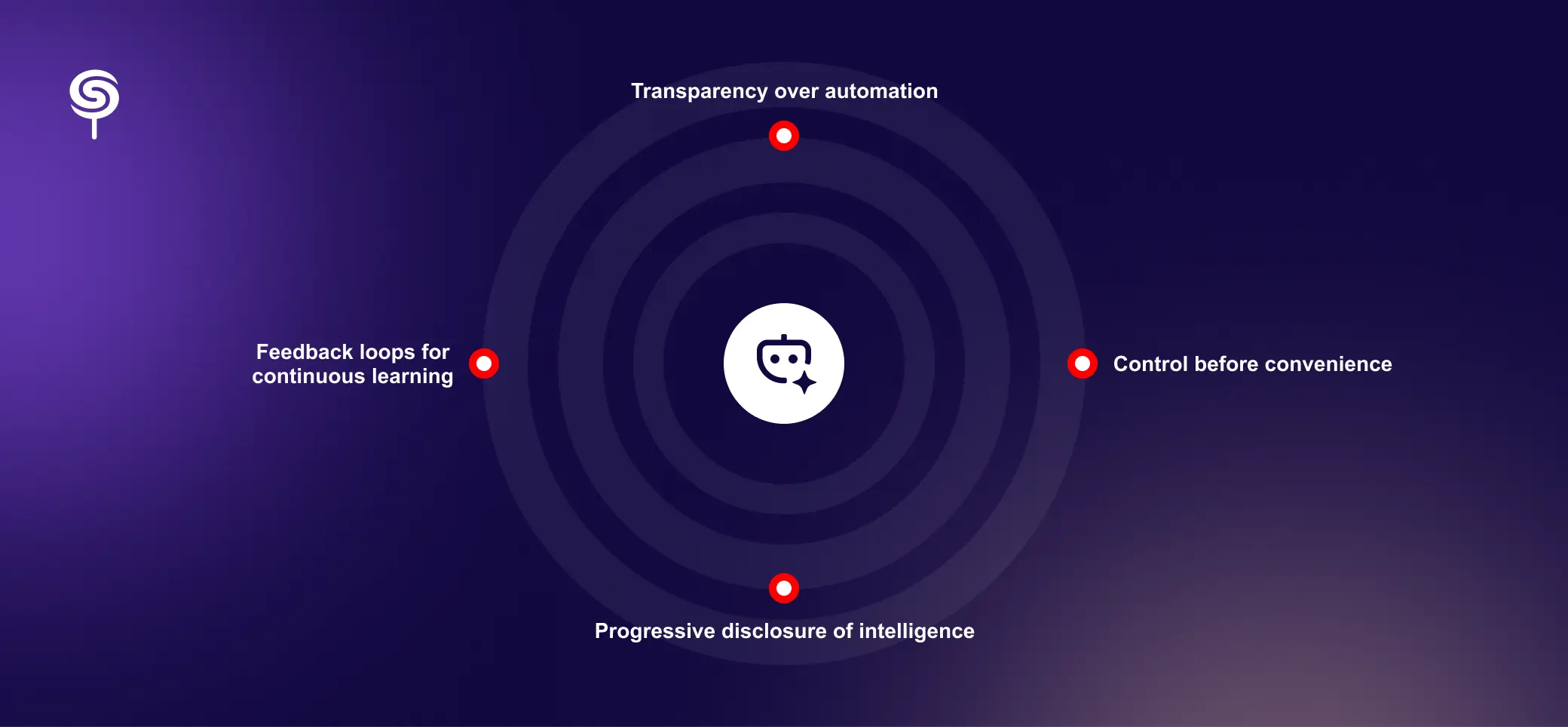
A UX-first approach to AI workflow design is built on four principles.
Transparency over automation. Users need to understand what the AI is doing and why. When AI takes an action drafting an email, classifying a support ticket, recommending a next step the interface should make that decision legible, not invisible. Trust is built through clarity.
Control before convenience. AI should enhance human decision-making, not replace it without consent. The best AI workflows give users meaningful control over automation the ability to review, override, or adjust AI outputs before they propagate downstream.
Progressive disclosure of intelligence. Not every user needs to see every AI capability on day one. Smart workflow design introduces AI features progressively, aligned with user experience levels and task complexity, to avoid overwhelming new users and to build habitual adoption over time.
Feedback loops for continuous learning. AI workflows improve through use. Your design should build in explicit and implicit feedback mechanisms so the system learns from user behavior, corrections, and preferences making the workflow smarter the more it is used.
A Step-by-Step AI Workflow Design Framework for B2B SaaS Teams
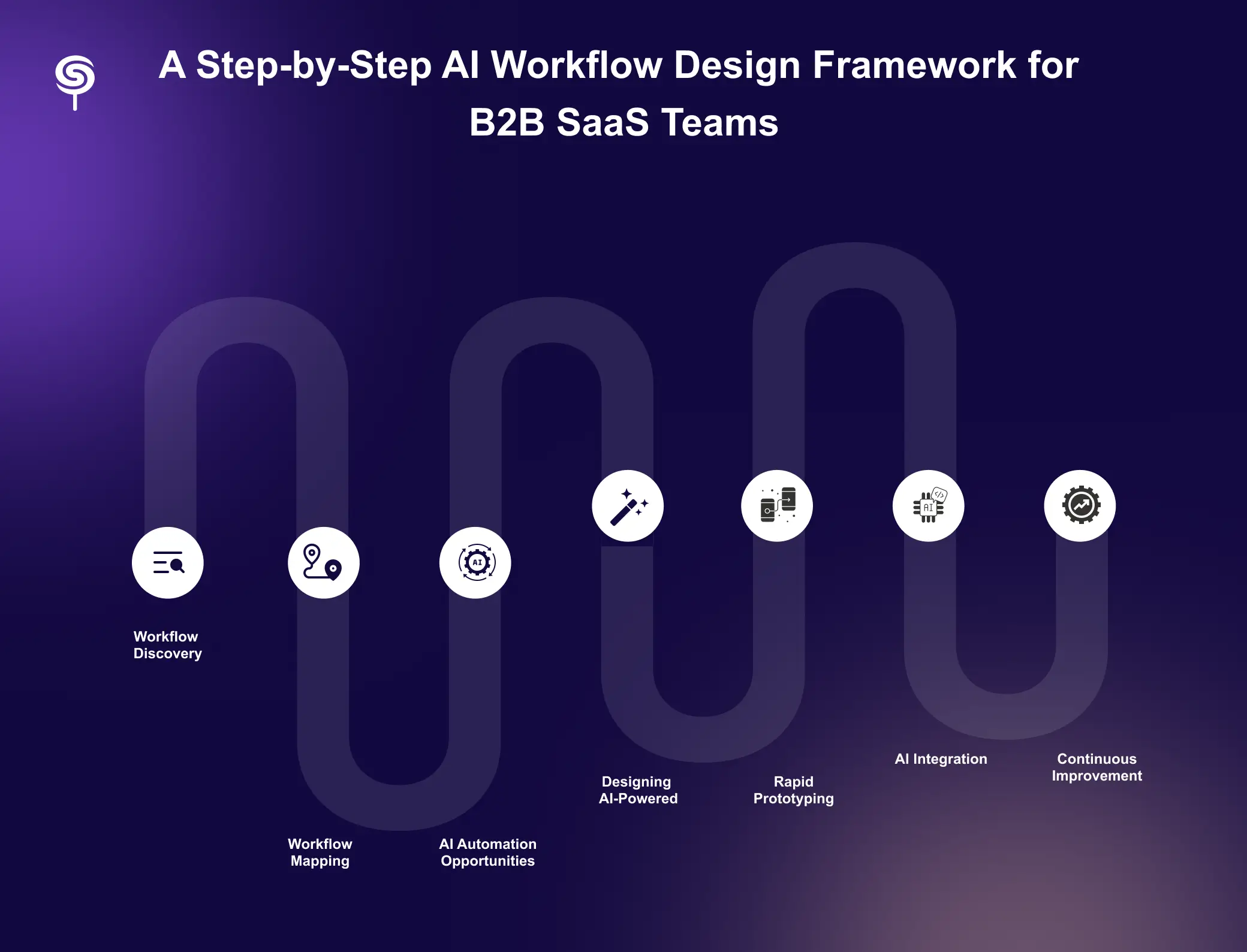
This is the framework CandyStudio uses with every SaaS client a structured, repeatable process that moves from discovery to deployment with strategic precision.
Step 1 – Workflow Discovery and Process Audit
Every AI workflow engagement begins with a thorough discovery phase. We conduct structured stakeholder interviews, shadow users during real work sessions, and audit existing tools and integrations to build a complete picture of how work actually flows through your organization.
This is not theoretical analysis. It is empirical research. We document every step, every handoff, every decision point, and every friction moment across your core workflows from lead capture to customer onboarding to product adoption to renewal.
The output of this phase is a Process UX Audit Report: a detailed map of your current state workflows, annotated with volume, frequency, error rate, and the estimated cost of manual effort at each step.
Step 2 – Workflow Mapping and Journey Visualization
With the audit complete, we build visual workflow maps that represent both the user journey and the operational process in parallel. These maps expose where user experience and operational efficiency diverge the gap between what users need and what the system currently delivers.
Workflow maps are designed to be shared and discussed across teams product, engineering, customer success, and leadership because AI workflow design requires organizational alignment, not just technical implementation. Everyone needs to see the same map before they can agree on where to take it.
Step 3 – Identifying AI Automation Opportunities
With a clear map in hand, we conduct an AI Opportunity Assessment. We evaluate each workflow segment against four criteria: volume (how often does this task occur?), variability (how consistent is the input?), value (what does automation save or unlock?), and viability (is an AI solution technically feasible and cost-effective?).
This assessment produces a prioritized list of automation opportunities ranked by ROI, effort, and strategic impact. We distinguish between quick wins automations that can be deployed in weeks with immediate value and strategic plays that require more design and development investment but deliver transformational results.
Step 4 – Designing AI-Powered User Experiences
This is where the strategic work becomes visible design. Our team creates interface concepts for every AI-powered workflow sketching how the AI will surface information, present suggestions, handle edge cases, and communicate uncertainty to users.
We design for the full range of AI states: loading, processing, success, failure, and low-confidence output. We define how the interface communicates what the AI did, how confident it is, and how the user can override or adjust its output. We also design the onboarding experience for AI features because even the most powerful automation is worthless if users do not know it exists or do not trust it enough to rely on it.
Step 5 – Rapid Prototyping and Workflow Validation
Before any code is written, we build interactive prototypes of the AI-powered workflows and validate them with real users. This phase is critical because it catches design assumptions that seem sound in theory but break down in practice.
User testing sessions are structured around task completion, error recovery, and trust calibration measuring not just whether users can complete the workflow, but whether they understand what the AI did and whether they feel confident in its outputs. Findings from this phase directly inform the final design specifications handed to engineering.
Step 6 – Development and AI Integration
With validated designs, development begins. CandyStudio works alongside your engineering team or our own development partners to implement the AI integrations, connect to the relevant APIs and data sources, and build the front-end interfaces that bring the workflows to life.
We maintain a design system throughout development to ensure that AI components loading states, confidence indicators, suggestion cards, override controls are implemented consistently across the product. Consistency in AI interaction patterns is essential for building user trust.
Step 7 – Monitoring, Optimization, and Continuous Improvement
Deployment is not the end of the workflow design process. It is the beginning of the optimization phase. We establish a monitoring framework to track AI workflow performance across three dimensions: technical performance (latency, error rate, accuracy), user behavior (adoption rate, override frequency, task completion), and business impact (time saved, revenue influenced, churn reduced).
This data informs a continuous improvement cycle surfacing opportunities to refine automation rules, retrain models, redesign interaction patterns, or expand the AI's scope based on real-world usage.
Real-World Examples of AI Workflow Design in B2B SaaS
Customer Onboarding Automation. A project management SaaS reduced time-to-value from 14 days to 3 days by using AI to analyze new user behavior in the first 48 hours and automatically trigger personalized onboarding sequences the right tutorial, the right prompt, the right feature introduction based on how each user was actually engaging with the product, not a generic linear flow.
Intelligent Support Triage. A B2B data platform cut support ticket resolution time by 60 percent by implementing an AI triage layer that classifies incoming tickets, matches them to historical resolutions, and routes complex cases to the appropriate specialist with full context already assembled eliminating the manual classification and context-gathering steps that consumed 40 percent of their support team's time.
Sales Intelligence Workflow. A SaaS CRM used AI to automate account research and meeting preparation, pulling relevant company news, product usage data, and previous interaction history into a pre-meeting brief for each sales call reducing rep preparation time from 45 minutes to 5, while improving call quality and close rates.
Each of these outcomes was achieved not by adding AI features, but by redesigning workflows with AI embedded intelligently into the user experience.
Key Benefits of AI Workflow Design for SaaS Businesses
The compounding business impact of intelligent AI workflow design manifests across every part of your SaaS operation.
Accelerated product adoption. When your product guides users intelligently rather than leaving them to navigate complexity on their own, activation rates improve dramatically. AI-powered onboarding and contextual guidance reduce the learning curve and increase the proportion of users who reach the "aha moment" that drives long-term retention.
Reduced operational costs. Every workflow task that AI handles classification, routing, drafting, scheduling, data enrichment is a task your team no longer does manually. At scale, this translates into significant savings in headcount, time, and the error-correction costs that manual processes inevitably generate.
Improved retention and reduced churn. Users who experience a product as intelligent and helpful are more likely to build it into their daily workflows, less likely to explore alternatives, and more likely to expand their usage over time. AI workflow design converts passive users into deeply habitual ones.
Faster time-to-value for new features. When your AI infrastructure and design system are built on a solid workflow foundation, adding new AI capabilities becomes dramatically faster and less risky. The architecture is already there. The design patterns are already established. The users already trust the system.
Competitive differentiation that compounds. AI workflow design creates a defensible competitive moat. As your AI systems accumulate usage data, they improve. As they improve, user experience improves. As user experience improves, retention and referrals improve. This is a compounding advantage that competitors cannot replicate by simply copying your feature list.
How CandyStudio Helps SaaS Teams Design Smarter AI Workflows
CandyStudio is a growth-focused product design agency specializing in AI UX design, SaaS workflow strategy, and AI-powered automation solutions for B2B software companies.
We work with SaaS founders, product teams, and growth leaders who are serious about using design as a strategic lever not just to make their product look good, but to make it work better, convert more users, and retain them longer.
Our AI workflow design engagements begin with a comprehensive UX Audit a deep-dive review of your current product workflows, user experience, and automation landscape. This UX audit produces a clear, prioritized roadmap of AI workflow opportunities, ranked by business impact and implementation feasibility, that gives your team immediate direction and strategic clarity.
Conclusion
The SaaS teams that will define the next decade of B2B software are not the ones with the most features. They are the ones with the most intelligent workflows.
AI workflow design is the strategic discipline that bridges the gap between what your product can do and what your users experience every day. It is the difference between a product that frustrates and a product that delights. Between a team that drowns in manual work and one that scales with leverage.
The framework is clear. The business case is proven. The competitive pressure is building.
The question for every SaaS founder, product leader, and growth team is this: are you going to design your AI workflows intentionally or let complexity design them for you?
CandyStudio exists to help you do it intentionally. Let us show you how.
Frequently Asked Questions
1. What is AI workflow design for SaaS products?
AI workflow design is the process of strategically identifying, mapping, and redesigning product and operational workflows to embed artificial intelligence at points of highest friction, highest volume, or highest decision complexity creating a more intelligent, efficient, and user-friendly product experience.
2. How do I choose the first workflow to automate with AI?
Use a prioritization formula that weights business impact (revenue, cost savings), feasibility (data readiness), and risk. Start with workflows that have clear outcome metrics and relatively structured inputs.
3. Does CandyStudio provide engineering implementation?
CandyStudio partners with client engineering teams or recommended implementation partners to ensure production-grade AI integration. We focus on design, UX, product strategy, and run a tight handoff with engineering.
4. How long does it take to design and implement AI workflows in a SaaS product?
Timelines vary based on scope and complexity. Quick-win automations can often be designed and deployed within four to six weeks. Comprehensive AI workflow redesigns for mature SaaS products typically take three to six months from discovery to deployment, with ongoing optimization thereafter.
Share this blog!
Latest Blogs
Explore our latest insights on design, AI, and digital innovation.