Increase Retention with a Data-Driven UX Audit
Author
Vignesh
Published On
Customer acquisition is getting more expensive every year. Yet many startups and ecommerce businesses continue losing users after the first interaction not because of poor products, but because of hidden UX problems.
Users abandon carts. SaaS customers stop onboarding midway. Product engagement drops after signup. Retention declines quietly while teams focus only on traffic and acquisition. Most businesses assume the issue is marketing, pricing, or competition.
In reality, the problem often starts with user experience.
A data-driven UX audit helps businesses identify where users struggle, why they leave, and what changes can improve retention, conversions, and long-term customer value. Instead of relying on assumptions, teams use behavioral insights, analytics, and usability evaluation to optimize the entire product journey. For startups, SaaS platforms, and ecommerce brands, UX audits have become a critical growth strategy not just a design exercise.
Why Startups Struggle with Retention
Startups move fast. Teams prioritize launches, feature releases, and growth experiments. In the process, user experience decisions are often reactive instead of strategic.
Here's a pattern that repeats itself across industries: a founder builds something genuinely useful. Early users are enthusiastic. The team ships fast, iterates faster, and at some point usually between months three and six growth plateaus. Churn creeps up. Activation rates drop. Customer support tickets start piling up with variations of "I can't figure out how to…"
1. The product evolved, but the UX didn't
Features get added on top of features. Navigation grows organically without architecture. What made sense at version 1.0 becomes a labyrinth by version 3.0.
2. Assumptions replaced user research
In the rush to ship, teams make UX decisions based on internal logic rather than observed user behavior. "It's intuitive" is often said by the person who built it not the person using it for the first time.
3. Data is collected but not interpreted
Most teams have Google Analytics, Hotjar, or Mixpanel installed. But raw data without a strategic lens doesn't tell you why users are dropping off at that specific step it only tells you that they are.
4. No one owns the full user journey
Designers own the UI. Developers own the build. Product managers own the roadmap. But the end-to-end emotional and functional experience the user actually lives through? Often, nobody owns that holistically.
Hidden UX Problems That Are Silently Killing Your Growth
Before looking at solutions, it's worth naming the specific friction points that a product UX audit most commonly silent killers issues that rarely trigger a support ticket but consistently drive users away.
1. Cognitive Overload on Key Screens
The moment a user feels overwhelmed by too many options, unclear hierarchy, or dense information their brain defaults to exit. This is particularly damaging on checkout pages, onboarding flows, and pricing pages, where decisiveness is the entire goal. Cognitive overload is rarely obvious to the team that built the screen; it's only visible through user testing and behavioral heatmaps.
2. Broken or Unclear Onboarding Flows
For SaaS products especially, the first five minutes determine the next five months. If a new user can't reach their first "aha moment" quickly, they will not return. Poor onboarding missing progress indicators, no contextual guidance, unclear next steps is one of the top drivers of early churn. A SaaS UX audit almost always starts here.
3. Mobile Experience Gaps
More than 60% of ecommerce traffic now comes from mobile devices, yet many product teams still design desktop-first and adapt mobile as an afterthought. Tap targets too small, forms too long, checkout flows that require desktop-level precision these are conversion killers hiding in plain sight.
4. Slow Load Times and Performance Friction
UX isn't just visual. A page that takes three seconds to load loses a significant portion of its visitors before they see a single pixel of your design. Page speed is both a UX issue and an SEO ranking factor, making it doubly important for growth-focused businesses.
5. Trust Signal Deficiencies
On ecommerce sites and SaaS landing pages alike, the absence of social proof, security badges, clear return policies, or transparent pricing creates unconscious hesitation. Users don't always articulate why they left they just did.
The Data-Driven UX Audit Framework: How It Actually Works
A professional user experience audit is not a subjective design critique. It's a structured, evidence-based process that combines quantitative data, qualitative research, and heuristic evaluation to produce a prioritized action plan. Here's the framework we use with ecommerce businesses, SaaS products, and startup teams.
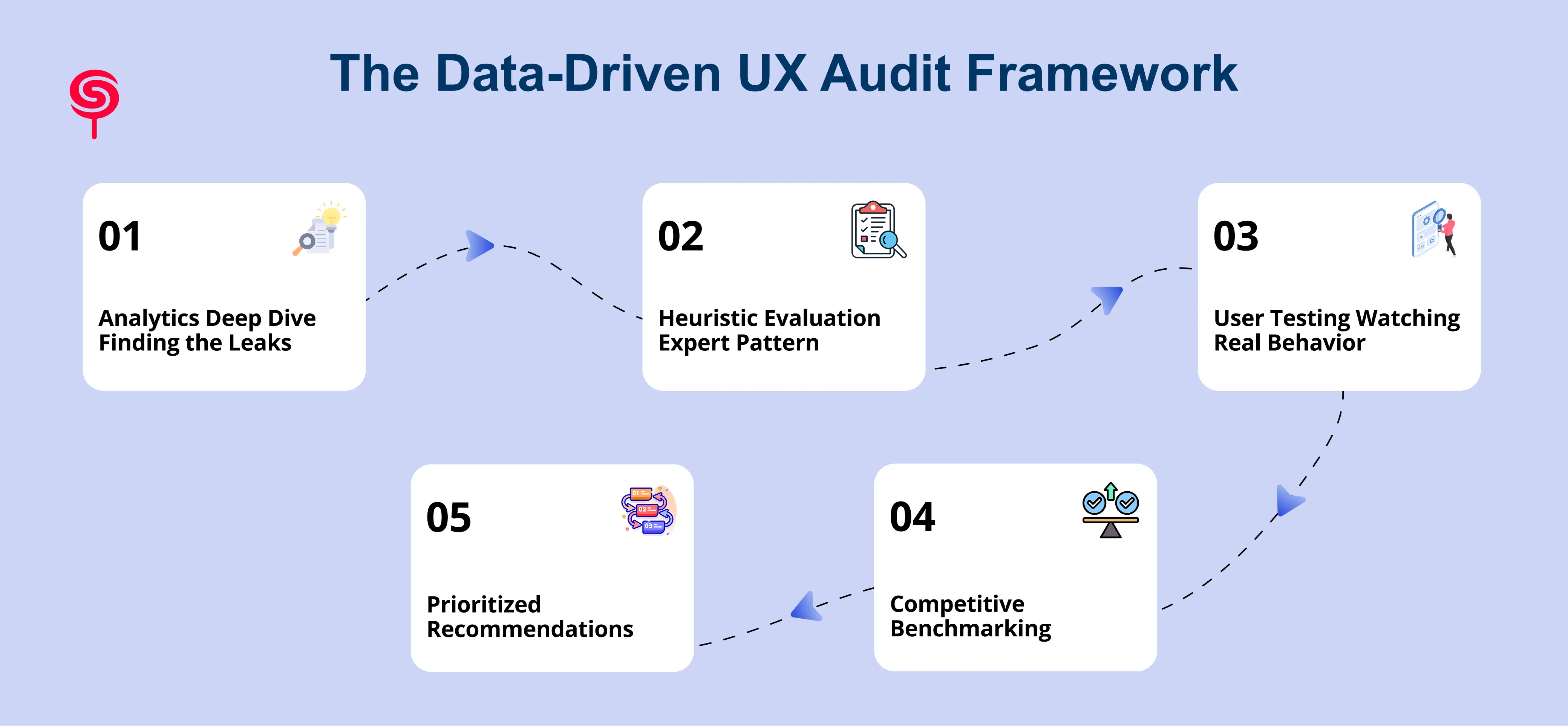
Phase 1: Analytics Deep Dive Finding the Leaks
The audit begins with data, not opinions. This phase involves a thorough analysis of your existing behavioral analytics:
Funnel analysis: Where exactly in the user journey does drop-off occur? Entry points, onboarding steps, checkout stages, feature adoption paths.
Session recordings: Real video of real users navigating your product. This is where you see hesitation, rage clicks, and the exact moments people give up.
Heatmaps and scroll maps: Which parts of a page get attention, and which are invisible to users?
Cohort analysis: Which user segments retain well, and which churn early? This often reveals hidden UX personalization opportunities.
The goal of Phase 1 is to move from "we have a retention problem" to "we have a specific drop-off at step 4 of onboarding, primarily affecting mobile users who signed up through paid ads."
Phase 2: Heuristic Evaluation Expert Pattern Recognition
With data context established, UX strategists evaluate the product against established usability principles Nielsen's 10 Heuristics, WCAG accessibility standards, and conversion-focused UX patterns. This is where deep expertise pays off: an experienced auditor can see patterns that analytics alone don't capture.
Common findings at this phase include inconsistent interaction patterns, poor error messaging, accessibility barriers that exclude users, and information architecture that doesn't match users' mental models.
Phase 3: User Testing Watching Real Behavior
No audit is complete without direct user observation. Whether through moderated sessions, unmoderated remote testing, or targeted user interviews, this phase answers the "why" behind the data. Users are asked to complete core tasks checkout, account setup, feature discovery while thinking aloud.
This is often where the most surprising insights emerge. A button that looks perfectly clear to the design team turns out to be invisible to new users. A form field that seems standard causes significant anxiety around data privacy.
Phase 4: Competitive Benchmarking
How does your UX compare to the leading products in your category? Benchmarking against direct competitors and best-in-class experiences (even from adjacent industries) identifies gaps and opportunities that internal teams are too close to see.
Phase 5: Prioritized Recommendations The Audit Deliverable
The output of a professional UX audit for startups or ecommerce teams is not a list of problems. It's a prioritized roadmap of improvements, categorized by:
Impact level (high / medium / low effect on retention and conversion)
Implementation effort (quick wins vs. structural changes)
Business priority (what aligns with your growth goals this quarter)
This gives your product, design, and engineering teams a clear, actionable plan not a theoretical wish list.
Practical UX Fixes That Move the Retention Needle
Theory is useful. Results are better. Here are the types of changes that consistently emerge from a UX audit for retention and the outcomes they drive.
1. Simplifying onboarding from 8 steps to 4
One SaaS team we audited had an onboarding flow that required users to complete integrations, invite teammates, and configure preferences before ever experiencing the core product value. Restructuring the flow to deliver a quick win first within two minutes of signup increased day-7 retention by 34%.
2. Redesigning the mobile checkout experience
An ecommerce brand was seeing 78% cart abandonment on mobile. The UX audit revealed a guest checkout form with 14 required fields, no progress indicator, and a CTA button below the fold on smaller screens. After the redesign: three fields, a progress bar, and an above-fold CTA. Checkout completion rate improved by 41%.
3. Adding contextual empty states
A B2B SaaS product had a dashboard that appeared completely blank for new users who hadn't yet imported data. Without guidance, users assumed something was broken and left. Adding instructional empty states with clear next steps reduced early churn by 22%.
4. Improving error message specificity
Vague error messages ("Something went wrong") create distrust and dead ends. Replacing them with specific, actionable guidance ("Your card was declined check the billing zip code matches your statement") reduced support escalations and improved form completion rates significantly.
The Business Outcomes: What a UX Audit Actually Returns
Let's talk ROI because that's ultimately what a retention-focused UX investment needs to justify.
Consider the math for an ecommerce business generating $500K annually with a 3% conversion rate and 65% cart abandonment. Reducing cart abandonment by just 10 percentage points through UX improvements doesn't just "feel better" it translates directly into tens of thousands in recovered revenue. For a SaaS product with 1,000 active users and $50 monthly ARPU, improving 30-day retention from 60% to 75% compounds into six-figure ARR improvement over 12 months.
Beyond the direct revenue impact, a UX optimization for retention strategy delivers:
Lower customer acquisition costs: when you retain more users, you need to acquire fewer replacements, reducing your effective CAC
Higher LTV: retained users buy more, upgrade plans, and refer others
Reduced support burden: intuitive UX means fewer support tickets and lower operational costs
Stronger product-market fit signals: high retention is the clearest indicator that your product genuinely solves the problem
The ROI on professional user experience audit services is rarely below 5:1 when implemented with discipline.
Why Expert UX Audits Outperform Internal Reviews
It's a reasonable question: can't your internal team run this audit themselves?
Sometimes, yes partially. But there are structural limitations to internal audits that consistently produce blind spots.
1. Familiarity bias is real
Teams that build a product day-to-day lose the ability to see it as a first-time user does. Every confusing interface looks obvious to someone who designed it.
2. Expertise gaps create incomplete analysis
A thorough UX audit requires skills across user research methodology, behavioral analytics, accessibility, conversion optimization, and information architecture. Few internal teams have all of these capabilities at a senior level simultaneously.
3. Internal politics slow down honest assessment
When the person evaluating the UX is also the person who built it or reports to someone who did objectivity is compromised. External UX audit agencies produce findings that are harder to dismiss and easier to act on.
4. Speed and focus matter
A dedicated UX audit engagement delivers a comprehensive findings report in weeks, not the months it would take for an internal team to conduct this work alongside their regular responsibilities.
The best outcomes come from a partnership model: an external UX audit agency brings fresh eyes, deep expertise, and structured methodology. Your internal team brings product context, technical constraints, and implementation capacity. Together, the gap between diagnosis and improvement closes fast.
Conclusion: Stop Guessing. Start Auditing.
If your ecommerce store has a checkout drop-off problem, if your SaaS product is losing users after onboarding, if your D2C brand can't figure out why acquisition numbers don't translate to retention you don't have a marketing problem. You have a UX problem.
And UX problems are solvable. Systematically, measurably, and with direct impact on your bottom line.
A data-driven UX audit is not a luxury for enterprise companies with large budgets. It's a growth investment for any founder, product team, or brand that wants to stop losing users they worked hard to acquire. The frameworks exist. The data is already there. What's missing is the strategic lens to interpret it and the expertise to act on it.
Your users are telling you exactly what's wrong through their behavior, their drop-offs, their rage clicks, and their silence after day three. A UX audit is how you finally listen.
Frequently Asked Questions
1. What is a UX audit for retention?
A UX audit for retention evaluates user experience issues that negatively impact customer engagement, repeat usage, and long-term retention. It identifies friction points across onboarding, navigation, conversions, and product interactions.
2. Can a UX audit increase customer lifetime value?
Yes. Better user experiences improve engagement, trust, and retention, which directly increases customer lifetime value over time.
3. How do I know if my product needs a UX audit?
If you're experiencing high churn, low activation rates, significant drop-off at specific funnel stages, increasing support tickets about navigation or usability, or stagnant conversion rates despite traffic growth these are strong signals that a UX audit will uncover actionable improvements.
4. Will a UX audit improve revenue?
Yes, when executed correctly. Many clients see measurable increases in conversion and retention that directly improve LTV and payback period. ROI depends on baseline metrics, traffic, and implementation speed.
Share this blog!
Latest Blogs
Explore our latest insights on design, AI, and digital innovation.