The New UX Principles Powering Successful AI Startups
Author
Vignesh
Published On

AI is no longer an experimental feature; it’s the backbone of modern SaaS, powering smarter automation, personalised workflows, and new product categories. Yet many AI startups struggle not because their models fail, but because users don’t adopt them. The real problem isn’t accuracy alone it’s how AI is integrated into workflows, communicated to users, and trusted over time. For founders and product teams wrestling with churn, stalled adoption, and feature bloat, rethinking UX for AI is the fastest path to measurable growth. This is where CandyStudio helps: we design AI workflows and product experiences that turn curiosity into consistent, revenue-driving usage.
The Unique UX Challenges Facing AI Startups Today
The promise of AI is automation, speed, and intelligence. The reality for most early-stage teams is that users experience something very different: unpredictability, confusion, and eroded trust. Before exploring solutions, it is worth naming the specific friction points that make designing AI products fundamentally different from designing conventional SaaS tools.
The Black Box Problem
When a traditional application performs an action, users understand the cause and effect they clicked a button, something happened. When an AI system makes a recommendation, writes copy, or flags a risk, users cannot see why. This opacity is not just a technical limitation; it is a trust-destroying experience that causes users to second-guess every output and eventually abandon the product altogether.
Inconsistent Outputs Shatter Mental Models
Users build mental models of how software behaves. AI products resist consistent mental models because outputs vary based on inputs, context, and probabilistic inference. When a product behaves differently from session to session, users experience cognitive dissonance and cognitive dissonance reliably leads to churn. Designing for this variability is one of the hardest and most underestimated challenges in AI UX design.
Onboarding Fails to Transfer Confidence
Most AI products are onboarded like traditional SaaS tools a product tour, a few tooltips, and a prompt to get started. This approach collapses with AI, where the product's value proposition often depends on the user trusting a non-deterministic system. Users who do not build confidence in the first session rarely return.
Ethical Anxiety is Real
Enterprise buyers and end users alike are increasingly alert to data privacy, algorithmic bias, and the consequences of automated decisions. If your product does not proactively address these concerns in the interface itself, you will lose deals to competitors who do regardless of how superior your technology is.
Why Traditional UX Principles Need to Evolve for AI Products
Conventional UX rules simplicity, consistency, discoverability still matter, but they’re insufficient when the product’s core behavior is driven by opaque algorithms. Traditional UX assumes predictable states and repeatable actions; AI introduces uncertainty, model drift, and human-in-the-loop scenarios that demand new design priorities. Startups that treat AI like a feature instead of a dynamic collaborator will see slow adoption and poor long-term retention. To win, product teams must adopt principles that prioritize trust, explainability, control, and continuous learning.
Principle: 1 — Design for Trust Before Efficiency
Trust is the currency of AI adoption. Users will trade efficiency for reliability only when they believe the system won’t lead them astray. Build trust with transparent error rates, confidence indicators, and conservative defaults that let users verify before they act. For example, show confidence scores for recommendations, surface provenance for data-driven suggestions, and provide easy ways to revert or audit AI-driven changes. Trust-first design reduces fear of automation and accelerates habit formation.
Principle: 2 — Make AI Decisions Explainable
Explainability isn’t just a regulatory checkbox; it’s a UX requirement. Present short, actionable explanations that answer “why” the AI suggested something and “how” it arrived there. Use layered explanations one-line rationales for quick scanning, expandable reasons for power users, and visual cues (highlighted inputs, timelines) for complex decisions. Testing multiple explanation formats with real users quickly reveals which explanations actually drive understanding and confidence.
Principle: 3 — Keep Humans in Control
AI should enhance human decision-making, not replace it. Design interfaces that make the human role explicit: confirm critical actions, offer alternatives, and allow users to override or adjust AI suggestions. Provide “what-if” sliders to simulate different AI behaviors, and create UX audit trails so users can trace changes. Keeping humans firmly in control prevents catastrophic automation errors and builds long-term trust.
Principle: 4 — Reduce Cognitive Load Through Simplicity
AI adds layers of complexity; good UX removes unnecessary mental effort. Avoid burying AI features behind technical terms. Use familiar metaphors and predictable patterns so users can apply existing mental models. Limit simultaneous AI-driven changes, chunk tasks into digestible steps, and use progressive disclosure to reveal advanced controls only when users need them. Simplicity increases throughput and shortens the time to first value.
Principle: 5 — Design Effective AI Onboarding Experiences
Onboarding determines adoption. AI onboarding must do two things: demonstrate immediate value and teach safe usage. Use goal-focused onboarding flows that ask about intent, then tailor examples and defaults to those goals. Include interactive demos where users can test AI with sandbox data, and show simple metrics that track improvement as users engage. A bad onboarding experience trains users to distrust the system; a great one converts skeptics into advocates.
Principle: 6 — Build Continuous Learning and Feedback Loops
AI products should be designed to learn from users not just models, but experience design. Embed lightweight feedback mechanisms (thumbs up/down, corrections, quick surveys) at decision points. Surface aggregated user feedback trends and show how the product improved as a result. This creates a virtuous cycle: users feel heard, models improve, and the product becomes more valuable. Also design analytics dashboards that show product teams which AI suggestions are accepted, rejected, or ignored these are your action signals.
Principle: 7 — Design Conversational Experiences That Feel Human
Conversational AI is powerful when it mimics human rhythm without pretending to be human. Use natural language patterns, give the system a predictable personality aligned with brand tone, and confirm ambiguous user intents before executing. When conversation goes off-track, provide graceful recovery options and clear escape hatches. Good conversational UX balances brevity with clarity short, contextual prompts beat long, generic explanations.
Principle: 8 — Prioritize Ethical and Responsible AI Experiences
Ethics and responsibility are not optional. Embed bias checks, fairness indicators, and privacy-first defaults into the UX. Make data usage transparent and simple to control, and provide clear redress paths when outcomes are disputed. For startups, prioritizing ethical UX reduces legal risk, builds a reputation advantage, and often increases adoption among privacy-conscious buyers.
Real-World Examples of AI Startups Applying Modern UX Principles
These principles are not theoretical. They are drawn from what the most successful AI product companies are doing right now, and the patterns are consistent across categories.
Notion AI: Explainability Without Complexity
Notion's AI integration succeeded where many competitors stumbled because it met users inside a workflow they already trusted. Rather than launching a standalone AI product, Notion embedded AI suggestions inline with existing document editing, with a clear visual language distinguishing AI-generated content from user-written content. Users always knew what was AI and what was theirs, a simple but powerful explainability mechanism that preserved the sense of authorship and control.
Grammarly: Feedback Loops That Build Loyalty
Grammarly turned the AI feedback loop into a core product feature by delivering weekly writing insights that show users how their writing has improved over time. This transforms what could be a transactional AI tool into a growth relationship. Users do not just use Grammarly they feel like Grammarly knows them. This is the commercial power of designing continuous learning experiences into the product itself.
Linear: Simplicity as a Competitive Strategy
Linear, the project management tool, has integrated AI features with extraordinary restraint. While competitors added AI dashboards and prediction panels, Linear's AI surfaces exactly one insight at the right moment in the workflow nothing more. The result is that users experience AI as a natural extension of their work rather than an additional cognitive burden to manage. This is progressive disclosure and cognitive load reduction executed at the product level.
Measuring the Business Impact of AI UX Design
Good AI UX drives measurable business outcomes: higher activation rates, better retention, reduced support costs, higher conversion to paid tiers, and increased upsell. Track a combination of product and business KPIs: time-to-first-success, suggestion acceptance rate, feature adoption curve, churn by usage cohort, support ticket volume, and revenue-per-user. A/B test explainability formats, onboarding flows, and control defaults to quantify impact. Even small percentage lifts in adoption compound dramatically in SaaS unit economics.
A Practical AI UX Framework for Startup Founders
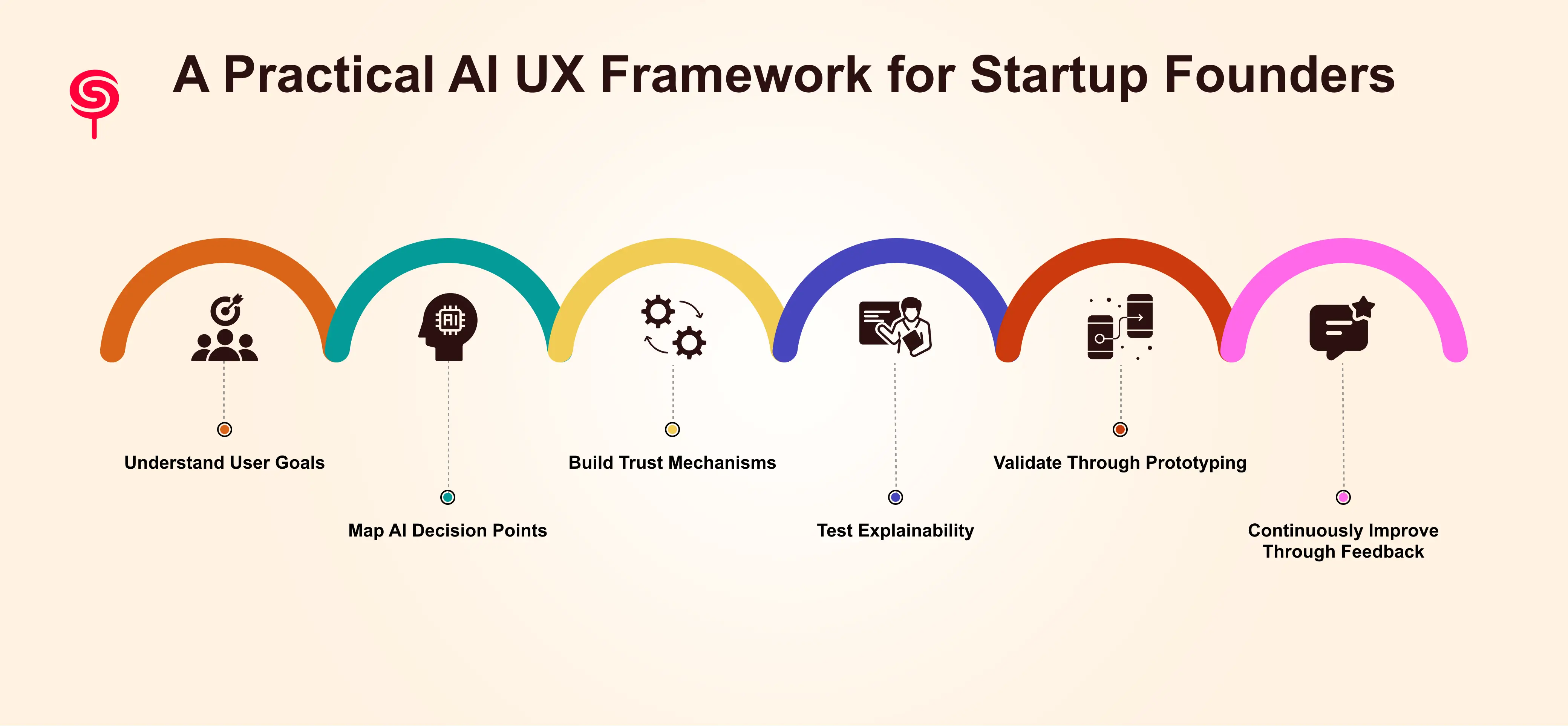
Step 1 — Understand User Goals
Most product teams are very clear on what users do in their product. Fewer understand what users are trying to achieve at the level of outcomes the career goals, business outcomes, and emotional needs that motivate their use of the product. This distinction matters enormously in AI design because AI products must justify their recommendations in terms of user goals, not just task completion.
Conduct a structured discovery sprint using outcome-based interview techniques. Map users' ultimate goals to the intermediate milestones they achieve using your product. This goal architecture becomes the design foundation for every AI interaction in your product.
Step 2 — Map AI Decision Points
Create a comprehensive map of every point in your product where the AI makes a decision, surfaces a recommendation, or takes an automated action. For each decision point, define: what data drives the decision, what the user sees, what actions the user can take, and what happens if the AI is wrong. This mapping exercise almost always surfaces critical gaps in explainability and human override gaps that are costing retention without being visible in your analytics.
Step 3 — Build Trust Mechanisms
For each AI decision point identified in “Map AI Decison point (Step-2)”, design the minimum trust mechanism required to make users comfortable acting on the output. For high-stakes decisions (budget recommendations, hiring decisions, customer communications), this means richer explainability and clear override affordances. For low-stakes decisions (formatting suggestions, scheduling optimizations), a simple confidence indicator may suffice. Calibrate trust investment to decision consequence.
Step 4 — Test Explainability
Run structured usability tests focused exclusively on explainability. Present users with AI outputs and ask them to narrate their understanding of why the AI produced that recommendation. The gaps between what you intended to communicate and what users actually understand are your design priorities. This test consistently surfaces insights that quantitative analytics cannot it is the highest-leverage user research investment for AI product teams.
Step 5 — Validate Through Prototyping
Build rapid prototypes of your revised AI UX patterns and test with users before engineering investment. Key prototyping questions: Does the onboarding experience produce a confident first win? Do users understand what the AI is doing without reading documentation? Do users know how to correct or override the AI when needed? Do they understand what data the AI uses? Answering these questions in prototype form is ten times faster and cheaper than answering them post-launch.
Step 6 — Continuously Improve Through Feedback
Establish a structured rhythm for analyzing both quantitative signals (which AI outputs do users act on, which do they ignore or override) and qualitative signals (in-product feedback, support conversations, user interviews). Create a feedback committee that includes product, design, and AI/ML team members and meets bi-weekly to review signals and prioritize UX improvements. The AI products that win long-term are the ones with the fastest design iteration cycles not the fastest engineering iteration cycles.
The Future of AI UX Design
AI UX will increasingly blur the line between product and assistant, demanding design systems that support dynamic behaviors, explainable interfaces, and modular human-in-the-loop patterns. Design systems will need components for confidence indicators, provenance chips, correction UX, and interaction patterns for model updates. Teams that invest in these reusable primitives will move faster and maintain consistent trust across features.
How CandyStudio Helps AI Startups Build Products Users Love
At CandyStudio, we combine AI product strategy, UX research, and conversion-focused design to help startups ship AI features that actually get adopted. We run discovery sprints to map user goals, design explainability-first interfaces, prototype sandboxed onboarding flows, and measure adoption with product-grade analytics. Our UX audits identify trust gaps and create prioritized roadmaps that align engineering work with measurable business outcomes. For founders, that means faster validation, better retention, and clear paths to monetization.
Conclusion
AI presents enormous product opportunity but also unique UX challenges. Startups that double down on trust, explainability, human control, and continuous learning will win. Prioritising these new UX principles makes AI features understandable, usable, and most importantly desirable. If your team is struggling to turn models into habits, a targeted UX audit and implementation roadmap can transform curiosity into loyal users.
Frequently Asked Questions
1. What are the most important UX principles for AI startups?
The most critical UX principles for AI startups are trust-first design, explainability, human control, and effective onboarding. These four principles address the core reasons users abandon AI products: they do not understand what the AI is doing, they do not trust its outputs, and they do not feel in control of the experience. Getting these right is the prerequisite for all other UX investment.
2. How do I measure the business impact of AI UX design?
The three primary metrics that reflect AI UX quality are activation rate (the percentage of new users who complete a meaningful first action), retention curve shape (whether users stay and expand or churn after initial use), and Time to First Value. Secondary metrics include feature adoption rates for AI-specific features, override and discard rates on AI outputs (high rates signal trust problems), and support ticket volume related to AI confusion. Strong AI UX design consistently improves all of these metrics within the first ninety days of implementation.
3. How can CandyStudio help with my AI product design?
CandyStudio offers AI UX audits, product design partnerships, and strategic advisory services for SaaS founders and AI startup teams. Our AI UX audit delivers a complete diagnostic of your current product experience with a prioritized roadmap of design improvements. Our product design partnerships support full product development from concept through validated experience. Book a complimentary strategy call to discuss your specific product context and identify your highest-leverage design opportunities.
4. Why does traditional UX fail for AI products?
Traditional UX was designed for deterministic software where cause and effect are predictable. AI products produce probabilistic outputs that vary with context, creating inconsistent user experiences that resist standard mental models. Traditional onboarding patterns fail to build the user confidence that AI products require. And traditional feedback mechanisms do not account for the need to communicate AI reasoning. AI products require an expanded UX framework that addresses trust, explainability, and the ethics of automated decision-making.
Share this blog!
Latest Blogs
Explore our latest insights on design, AI, and digital innovation.